 Built in South AfricaBuilt in South Africa, for service businesses
Enable your business. Automate the admin.
Quotes approved with a tap, jobs booked in order, invoices straight from the job, and reminders that bring customers back. Less admin, more of the work that pays.
- From R 499 a month
- No per-message fees from us
- Cancel any time
One place to run your business. Every customer kept in the loop.
ArkCRM brings your customers, quotes, scheduling, jobs, invoices and payments together in one place, giving you a clear view of your business without juggling notebooks, spreadsheets and WhatsApp conversations. Whether you work alone or manage a team in the field, everyone stays organised and on the same page.
From sending quotes and invoices to reminding customers when their next service is due, ArkCRM handles the routine communication that keeps your business moving. Customers can receive documents, respond to reminders and confirm or reschedule appointments, while their responses flow back into ArkCRM — keeping you informed without all the back-and-forth.
Less admin. Fewer missed appointments. Faster follow-ups. More repeat business.
Made for businesses that go to the customer
Especially the ones whose customers need them again every few months. Do the jobs yourself or send out a team: ArkCRM fits how you work.
Tap your trade to see a typical job in ArkCRM, step by step.
Re-treatments reminded when they're due, and your own certificates set up for you.
Pest control
A treatment, and the next one
- 1Your team, in ArkCRMQuote the treatment from your price list and send it as a link.
- 2Your customer respondsThey approve on their phone, with no call-back needed.
- 3Your team, in ArkCRMYour technician treats, ticks the checklist and takes photos. Your own certificate is filled in on site and filed against the customer.
- 4ArkCRM does itWhen the re-treatment falls due, ArkCRM reminds the customer from your WhatsApp number.
- 5Your customer respondsThey tap to confirm or pick another day. You book it, and the cycle starts again.
Re-treatments stop slipping through the cracks, and every certificate is on file when the customer needs it.
Book a demoInstalls quoted by link, your own CoCs, and safety checks reminded when they fall due.
Gas installations
From install to the next safety check
- 1Your team, in ArkCRMQuote the installation by link, with every part as a line item.
- 2Your customer respondsThey approve on their phone, and you book the installer.
- 3Your team, in ArkCRMPhotos and checklist on site. Your own CoC is filled in and filed against the customer.
- 4ArkCRM does itWhen the safety check is due, ArkCRM reminds the customer.
- 5Your customer respondsThey confirm with a tap, and you book the visit.
Every CoC on file, and every safety check remembered, without a spreadsheet of dates.
Book a demoCall-outs and installs quoted by link, with your own CoCs set up for you.
Electrical
A call-out, start to paid
- 1Your team, in ArkCRMOn site, build the quote and send it as a link before you leave.
- 2Your customer respondsThey approve on their phone, so you can start.
- 3Your team, in ArkCRMPhotos, notes and extra parts go on the job as you work. Your own CoC is filled in on site.
- 4Your team, in ArkCRMInvoice from the job's line items, and record the payment when it comes in.
- 5ArkCRM does itIt all stays on the customer's record, and month end is one accounting export.
No paper CoCs in the bakkie, and no more wondering whether a job was invoiced.
Book a demoInstalls quoted by link, and panel cleans and system services reminded on time.
Solar & backup power
The install is just the start
- 1Your team, in ArkCRMQuote the system by link: panels, inverter, batteries and labour as line items.
- 2Your customer respondsThey approve on their phone, and you book the install.
- 3Your team, in ArkCRMInstallers work through the checklist with photos. Your own CoC and handover report are filled in on site.
- 4ArkCRM does itWhen panel cleaning or a system service is due, ArkCRM reminds the customer.
- 5Your customer respondsThey confirm with a tap, and you book the visit.
Every install turns into regular service work.
Book a demoCall-outs and geyser installs quoted by link, and invoiced when the job's done.
Plumbing
A burst geyser, sorted
- 1Your team, in ArkCRMQuote the replacement from site and send it as a link.
- 2Your customer respondsThey approve on their phone while you're still there.
- 3Your team, in ArkCRMBefore-and-after photos, checklist done, extra parts added as you use them. Your own plumbing CoC is filled in on site.
- 4Your team, in ArkCRMNeed to come back? Book a callback linked to the original job.
- 5Your team, in ArkCRMInvoice from the job, and the customer sees it in their portal.
Quotes approved on the spot, and every callback traced back to the job that caused it.
Book a demoInstalls quoted by link, and regular services that bring customers back.
Aircon & refrigeration
Every install becomes a service customer
- 1Your team, in ArkCRMQuote the unit and installation by link.
- 2Your customer respondsThey approve, and you book the installer.
- 3Your team, in ArkCRMPhotos and the unit's details go on the job, and you set the customer's service schedule.
- 4ArkCRM does itWhen the service is due, ArkCRM reminds the customer.
- 5Your customer respondsThey confirm or pick another day, and you book it.
Services come back on schedule, not when you happen to remember.
Book a demoExtinguisher and hose reel services reminded on time, with your own service certificates.
Fire equipment
Services on time, proof on file
- 1Your team, in ArkCRMImport your customers and set each one's service schedule once.
- 2ArkCRM does itWhen extinguishers and hose reels are due, ArkCRM reminds each customer.
- 3Your customer respondsThey confirm with a tap, and you book the visit.
- 4Your team, in ArkCRMService on site with your checklist. Your own service certificate is filled in and filed.
- 5Your team, in ArkCRMInvoice from the job. The certificate stays on the customer's record.
No spreadsheet of due dates, and proof of every service when the customer's insurer asks.
Book a demoPump services, filter changes and water tests, reminded when they're due.
Borehole & water
Filters, pumps and tests that come round again
- 1Your team, in ArkCRMQuote the pump or filter installation by link.
- 2Your customer respondsThey approve, and you book the work.
- 3Your team, in ArkCRMPhotos, notes and test results go on the job, and you set the service schedule.
- 4ArkCRM does itWhen a filter change, pump service or water test is due, ArkCRM reminds the customer.
- 5Your customer respondsThey confirm with a tap, and you book it.
Filter changes become regular income, not a favour you remember.
Book a demoRepairs and call-outs quoted by link, and regular services reminded when they're due.
Pool care
Repairs without the back-and-forth
- 1Your team, in ArkCRMGreen pool or broken pump? Send the quote as a link.
- 2Your customer respondsThey approve on their phone.
- 3Your team, in ArkCRMDo the repair with photos, and add the parts you used.
- 4Your team, in ArkCRMInvoice from the job, and see who still owes you on one screen.
- 5ArkCRM does itWhen the pump or filter service is due, ArkCRM reminds the customer.
Repairs quoted and paid without a string of WhatsApp messages.
Book a demoDeep cleans, carpets and upholstery, with customers reminded when they're due again.
Cleaning services
One clean today, the next one booked
- 1Your team, in ArkCRMQuote the deep clean, carpets or upholstery by link.
- 2Your customer respondsThey approve on their phone.
- 3Your team, in ArkCRMYour team works through the checklist with before-and-after photos.
- 4Your team, in ArkCRMInvoice from the job, with a link to the customer's portal.
- 5ArkCRM does itWhen it's time for the next clean, ArkCRM reminds the customer, and they confirm with a tap.
One-off cleans turn into regular customers.
Book a demoGarden jobs and irrigation quoted by link, and repeat visits reminded and booked.
Garden & irrigation
Every garden's history in one place
- 1Your team, in ArkCRMQuote the makeover or irrigation install by link.
- 2Your customer respondsThey approve, and you book the team for a morning or afternoon.
- 3Your team, in ArkCRMBefore-and-after photos and notes go on the job.
- 4ArkCRM does itWhen the irrigation service or seasonal work is due, ArkCRM reminds the customer.
- 5Your customer respondsThey confirm with a tap, and you book it.
Seasonal work you never forget to offer, and every garden's history in one place.
Book a demo- Gate motors, generators, hygiene services or another trade? If you quote, do the job and get called back, ArkCRM fits.
Your evenings shouldn't go on WhatsApp admin
- Typing reminders one by one at 9 pm
- Driving out to customers who forgot you were coming
- Quotes lost in a WhatsApp thread, waiting for a "yes"
- Not sure who still owes you, or how much
- Service reminders go out by themselves, from your own number
- Customers confirm with one tap, or pick another day
- Quotes approved from their phone, with a tap
- One screen shows exactly who owes you
Your office, your team and your customers, on the same page
Everyone gets the view they need, and everyone works from the same up-to-date information.
Owner & office
In your browser · computer or phone
- Customers, quotes, the schedule, invoices and payments in one place
- Every job and who's on it, at a glance
- Service reminders, and follow-ups when nobody replies, go out automatically
- An export for your accountant at month end, in their software's format
Technician app
Phone app · Growth and up
- Today's jobs in order, with directions
- Start and finish jobs with checklists, photos and notes
- Record payment on site
- Time on site and travel, logged per job
Customer Portal
Any phone or computer · nothing to install
- Approve or decline a quote with a tap
- Confirm, move or skip a visit
- See their jobs, invoices and documents
- Opens from a WhatsApp or email link, with no password
How a job runs in ArkCRM
From the first call to the next service, in five steps.
- 1
Add the customer
When someone calls or messages, add their details and address once. Bring your existing list from a spreadsheet.
- 2
Send the quote
Price the job from your own services and send it as a link. Your customer approves or declines on their phone.
- 3
Book the work
Pick the technician, the day, morning or afternoon, and the order of visits.
- 4
Finish and invoice
Checklists, photos and notes on site. Invoice from the job and record payments as they come in.
- 5
Bring them back
When the next service is due, ArkCRM reminds your customer. They confirm with a tap, and you book the visit.
Three things you'll stop doing by hand
Quotes approved from their phone
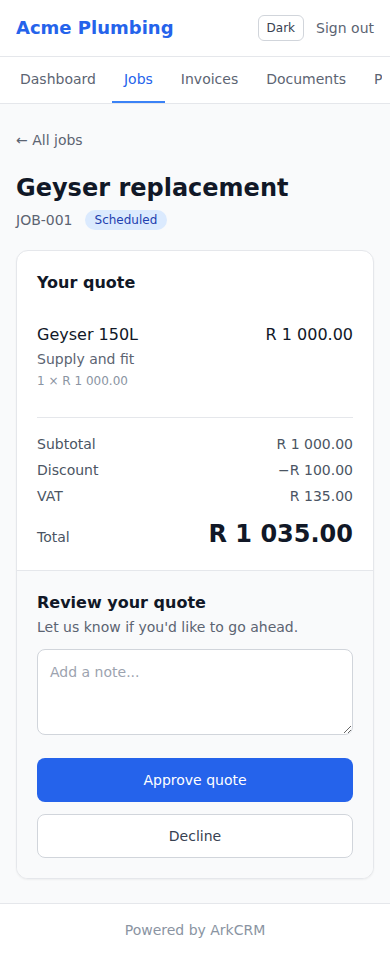
Build the quote from your own price list and send it as a link. Your customer sees every line and the total, taps Approve, and you know straight away.
Reminders that bring customers back
When a service falls due, ArkCRM reminds your customer from your own WhatsApp number, or by email. They confirm, pick another day or skip with a tap. Once you've booked the visit, they get another reminder the day before.
Know who's paid and who hasn't
Invoice from the job when it's done, record payments as they come in, and hand your accountant an export their accounting software can import.
From sign-up to up and running
Three steps, from the first call to your first real jobs in ArkCRM.
- Step 1
Understand your business
We start with a call about how you work: the services you offer, how customers book you, who does the work, and what you'd like off your plate. Then we show you ArkCRM set up for a business like yours.
- Step 2
Set up your workspace
Add your business details and logo, your services and prices, your team and your customer list. We help you connect your WhatsApp number. Certificates or reports in your own format are set up as a Custom solution, with a once-off setup fee.
- Step 3
Start running real work
Book your next jobs, send your first quotes and let the reminders run. On Growth, your technicians start their day in the Technician app. Questions along the way? Email us, and a real person answers.
How long it takes depends on your business: how many services and people you have, whether you bring a customer list, whether your WhatsApp number is ready to connect (Meta's side can take a few days), and whether you want certificates or reports in your own format. We'll give you a realistic idea on the first call.
Start small. Grow when you're ready.
Every plan includes quotes, invoices, service reminders and the Customer Portal. Billed monthly, no contract.
Which plan fits you?
Answer both questions and we'll point you to a plan.
Starter
For owners who do the jobs themselves, with someone in the office.
- Customers in one place: addresses, contacts, full job history and documents. Import your list from a spreadsheet
- Quotes your customers approve by link
- Invoices, payments and an accounting export
- A schedule by day, morning or afternoon
- Recurring services, with automatic WhatsApp and email reminders and a follow-up if nobody replies
- Job checklists and photos
- Customer Portal, with your business's logo
- 2 users
No extra users and no Technician app on Starter. Both start on Growth.
A fixed monthly price. Start with a demo, set up like your business.
Growth
For businesses with technicians or crews in the field.
Everything in Starter, plus:
- Technician app: the day's jobs in order, directions, checklists, photos, notes and payment on site
- Time on site and travel, logged per job
- Service bundles
- Quote designs in your own style
- 5 users included, R 120 a month per extra user
A fixed monthly price. Start with a demo, set up like your business.
Professional
For companies with several teams — installations, maintenance, service desks or branches.
Everything in Growth, set up with you around how each of your teams works.
Users, set-up and price are agreed with you.
Priced with you, case by case. Tell us how your teams work.
Built around how your business works
Still running parts of your business on paper, spreadsheets or phone calls? We'll build them into ArkCRM, so everything works in one place.
What you can count on
- Straight answers. We tell you what ArkCRM doesn't do, before you find out the hard way.
- You stay in charge. ArkCRM never books a job without you.
- Built around your business. When you need something ArkCRM doesn't do out of the box, we build it in as a Custom solution, so everything still works in one place.
- Your data stays yours. Export your customers, jobs and invoices any time. Your customers' consent to messages is recorded.
- Fair, local pricing. In rand, billed monthly, no contract. Your subscription is paid through Paystack, and we never see your card details.
- A real person to talk to. Email us at info@arkcrm.co.za.
Questions owners ask us
How long does setup take?
It depends on your business: how many services and people you have, whether you bring a customer list, whether your WhatsApp number is ready to connect, and whether you want your own certificates or reports set up. We'll give you a realistic idea on the first call.
Does ArkCRM work with WhatsApp and email?
Yes. Service reminders go on WhatsApp from your business's own WhatsApp Business number, with email as the fallback, and we help you connect your number. Until it's connected, reminders go by email. Meta charges a small fee for each WhatsApp message and bills your business directly; email costs nothing extra. Quotes and invoices go to your customer as a link and a PDF.
Do my customers need to install anything?
No. They get a WhatsApp or email and open a link on their phone, with no app and no password.
How do I arrange a demo?
Fill in the short form on our Book a demo page, or email info@arkcrm.co.za. We start with a short call to understand your business. Then we show you ArkCRM working for a business like yours, online or in person, whichever suits you. No obligation.
See ArkCRM set up like your business
Tell us how you work, and we'll show you quotes, bookings, reminders and invoices for a business like yours. No obligation.
Or email us at info@arkcrm.co.za